Preface
As an old yet powerful general-purpose tool, flex has accumulated a variety of small tricks to accommodate diverse development needs and to implement specific functionality. This article attempts to summarize some common practices from real-world engineering work with flex, for convenient reference later.
The core capability of flex is generating a yylex() function. This function automatically reads data from the input file, performs matching, and returns the corresponding token. When customizing a lexer, what the user needs to do is define lexical rules: tell flex what action to execute when a rule matches, and what value to return. In this way, by repeatedly calling yylex() to match the input stream, a complex piece of code can be broken down into a more orderly stream of tokens.
Adjusting IO Behavior
Although a DFA advances one character at a time during state transitions, for IO efficiency, actual file reads are usually done in batches into a buffer. If you need to fine-tune this read strategy, you can do so by defining the YY_INPUT macro. In the default generated code, this macro is defined as a fairly complex piece of C code; of course, you can also modify it as follows to change how input is read:
#undef YY_INPUT
#define YY_INPUT(buf,result,max_size) \
    if ( (result = fread( (char*)buf, sizeof(char), max_size, fin)) < 0) \
        YY_FATAL_ERROR( "read() in flex scanner failed");
Normally, flex reads from the file pointer yyin and writes output to yyout; these two pointers are initialized to stdin/stdout by default. After redefining the IO strategy as above, it will instead read from the file pointer fin, while the output destination remains the same. Of course, you can also directly overwrite where yyin/yyout point; the effect is equivalent.
Setting Initialization Code
We know that flex is essentially a "rule -> action" model: when the input matches some regular rule, it executes user-defined code actions, together with other auxiliary code, to implement the overall functionality. So what if we want to execute an initialization snippet before every rule match? Do we have to copy that code into every rule? In fact, you only need to define code that should run for every rule as the YY_USER_ACTION macro. Then, whenever a rule match occurs, it will be invoked automatically.
State Transitions in Lexical Analysis
Although flex uses a DFA to implement rule matching, you still need the state-machine mindset when writing rules. For a piece of code, generally there are three kinds of strings: the code itself, string literals, and comments. Most semantics are meaningless inside comments and string literals, so if you mix them together for processing, lexical rules will obviously become very redundant. Therefore, when constructing rules, we must also apply the idea of state transitions: being in code text is one state, and being in literals and comments are two other states. States can transition among each other: for example, if you encounter a symbol that marks the start of a comment, you enter the comment state; at that point you ignore all other rules until you encounter the end-of-comment marker, then you return to the code-text state and continue applying other rules for matching.
To achieve this, one approach is to define some global C variables to track the state, but a better approach is to use flex's own "conditional rules" feature. This feature means you can assign conditions to rules, and a rule is only active when its condition is enabled. Moreover, you can assign multiple conditions to a rule, and it will only be applied when all those conditions are satisfied. The biggest benefit is that the rule file can be kept very concise while still containing sufficient information.
For details, refer to section 10 of the flex documentation, "Start Conditions".
Reusing the DFA State Transition Graph
Flex is not only a powerful tool for building compilers; you can also reuse the state transition graph it generates for secondary development. Using the LeetCode problem Valid Number as an example, we will show how to leverage flex's DFA generation capability to solve this problem concisely and cleanly.
In short, the problem asks you to determine whether a floating-point number is valid. With Python's int conversion plus exception handling, a few lines of code suffice; with a regular expression, it is also straightforward. Of course, using such high-level features in a dynamic language to solve the problem is an obvious cop-out; if you insist on doing it in C and reinventing the wheel, then the finite automaton model behind regular expressions is the right tool for this kind of task. It avoids writing explicit case-by-case checks, and instead solves the whole thing with a loop and a matrix defining state transitions. The only issue is that for a regex with many states, manual derivation is painful.
Following the canonical method, you would first describe the regex using regular language, convert it to a nondeterministic finite automaton (NFA), then convert it to a deterministic finite automaton, and finally minimize the states. Each step looks feasible, but it is not very helpful here, because the intermediate process becomes messy, and you may lose control halfway through. Alternatively, you could derive the automaton based on experience and intuition; it might be simpler than rigorous math, but it still takes work and increases the chance of mistakes. In the end, for this problem, the minimized DFA looks like this:
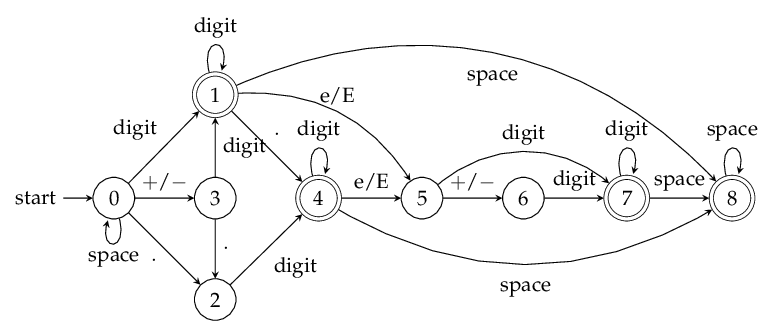
And for real-world work involving high-performance regex matching, the requirements are obviously more complex than this toy problem. Is there no simpler way besides blindly calling regex libraries or manually deriving automata? In fact, the old yet powerful flex tool provides a concise and clean solution here.
flex Rules
For the problem above, the flex lexical matching rules are as follows:
float.flex
WHITE   " "|\t|\f|\r|\v
%%
{WHITE}*[+-]?(([0-9]+(\.[0-9]*)?)|(\.[0-9]+))([Ee][+-]?[0-9]+)?{WHITE}* {return true;}
. {return false;}
%%
If you are familiar with flex rules, the meaning is obvious: first define whitespace characters (not actually necessary for this problem), then use one rule to match a valid floating-point format, and another rule to catch invalid cases. Then, running flex -o float.cpp float.flex generates the corresponding C++ source file. But clearly, the generated code cannot compile at all, because related functions and definitions are missing. We could of course fill in the missing pieces and directly use flex's output to meet our needs, but flex adds a lot of unnecessary redundancy when generating code, making the result very bloated. So it would be better if we could extract only what we need.
Extracting Useful Information
From the generated code, what we need is just two things: the DFA state transition graph (in matrix form), and the yylex() function used for lexical analysis, where the meaning of each state is defined. By default, flex outputs a compressed version of the transition matrix, because the full version is an Nx128 matrix (where N is the number of automaton states, and 128 is the character set size). Without compression, it would introduce unnecessary space overhead. Therefore, to output the full matrix, we need to add the -Cf parameter when invoking flex, i.e., flex -Cf -o float.cpp float.flex.
Then, the generated code will contain two statements like the following, defining the uncompressed transition matrix and the accept-state table:
static yyconst flex_int16_t yy_nxt[][128] = {...}
static yyconst flex_int16_t yy_accept[..] = {...}
Here yyconst is the const keyword. Perhaps for portability and user configurability, flex defines/typedefs many keywords into its own special tokens, but from their names you can generally infer what they mean.
With the transition graph in hand, the next question is how to use it. At this point, we need to refer to the lexer function—how yylex() is implemented. In the code generated by flex, even the function signature is defined as YY_DECL: #define YY_DECL int yylex (void). Fortunately it does not hurt readability too much. In short, once we find the function body corresponding to that identifier, we can analyze it. After removing some distracting comments, compilation directives, and so on, we get the following code skeleton (as you can see, the indentation is terrible):
YY_DECL
{
    register yy_state_type yy_current_state;
    register char *yy_cp, *yy_bp;
    register int yy_act;

    if ( !(yy_init) )
        {
        (yy_init) = 1;

        if ( ! (yy_start) )
            (yy_start) = 1; /* Define the start state */

        if ( ! yyin )
            yyin = stdin;   /* Define the input file */

        if ( ! yyout )
            yyout = stdout; /* Define the output file */

        if ( ! YY_CURRENT_BUFFER ) { /* Provide fine-tuning for the buffer */
            yyensure_buffer_stack ();
            YY_CURRENT_BUFFER_LVALUE =
                yy_create_buffer(yyin,YY_BUF_SIZE );
        }

    {
    while ( 1 )     /* Main loop, until EOF is read */
        {
        // The pointer-related parts below are for providing yytext
        // i.e., being able to extract the matched string after a successful match
        yy_cp = (yy_c_buf_p);

        /* Support of yytext. */
        *yy_cp = (yy_hold_char);

        /* yy_bp points to the position in yy_ch_buf of the start of
         * the current run.
         */
        yy_bp = yy_cp;

        yy_current_state = (yy_start);
yy_match:
        /* Keep performing state transitions here until no further transition is possible */
        /* Note that YY_SC_TO_UI is a macro that safely converts a character to the corresponding unsigned integer */
        /* Essentially, on the graph, transition based on the current state and the next character */
        while ( (yy_current_state = yy_nxt[yy_current_state][ YY_SC_TO_UI(*yy_cp) ]) > 0 )
            {
            if ( yy_accept[yy_current_state] )
                {
                (yy_last_accepting_state) = yy_current_state;
                (yy_last_accepting_cpos) = yy_cp;
                }

            ++yy_cp;
            }

        yy_current_state = -yy_current_state;

yy_find_action:
        /* Then check whether we stopped at an accepting state */
        yy_act = yy_accept[yy_current_state];

        YY_DO_BEFORE_ACTION;

do_action:  {...} // This mainly handles the case where EOF is read

case 1: /* This shows that in yy_accept, states with value 1 are accepting states; other states are invalid */
{return true;}
    YY_BREAK
case 2:
{return false;}
    YY_BREAK
case 3:
ECHO;
    YY_BREAK
case YY_STATE_EOF(INITIAL):
    yyterminate();

    case YY_END_OF_BUFFER:

    default:
        YY_FATAL_ERROR(
            "fatal flex scanner internal error--no action found" );
    } /* end of action switch */
        } /* end of scanning one token */
    } /* end of user's declarations */
} /* end of yylex */
From this, you can see that 1 represents the start node in the transition graph. During regex matching, we start from that point, read characters, and keep transitioning until we stop at some node and cannot transition further. At that point, we look up the value of the current state in the accept-state table; if it is 1, it is an accepting state; otherwise it is not. Note that the two 1s here have completely different meanings: the former is a state identifier, while the latter indicates whether a state is accepting.
Once we understand how yylex() uses the transition graph, we can embed it into our own program in the same way. In short, start from the same initial state, read characters one by one and transition; when no further transition is possible, or the input is exhausted, check whether we ended on an accepting state. The resulting solution code is shown in Appendix 1 at the end of the article. It does solve the problem, but because the code is too long, it cannot be submitted to LeetCode. Moreover, in real engineering, having such long code with so many hard-coded constants is also ugly.
Compressing the State Transition Matrix
To address the verbosity, we can try using flex's compressed matrix. Similarly, we need to analyze the exact behavior of yylex() and port it into our own program. As mentioned above, without the -Cf parameter, flex generates a compressed version of the transition matrix. Because the compression technique is somewhat tricky, the generated code defines multiple matrices for state transitions:
static yyconst flex_int16_t yy_accept[22] = {...}
static yyconst flex_int32_t yy_ec[256] = {...}
static yyconst flex_int32_t yy_meta[12] = {...}
static yyconst flex_int16_t yy_base[22] = {...}
static yyconst flex_int16_t yy_def[22] = {...}
static yyconst flex_int16_t yy_nxt[55] = {...}
static yyconst flex_int16_t yy_chk[55] = {...}
Now, the way yylex() uses these matrices becomes a bit more complex, but it can still be reconstructed directly. The transition loop looks like this:
yy_current_state = (yy_start);
yy_match:
do
    {
    register YY_CHAR yy_c = yy_ec[YY_SC_TO_UI(*yy_cp)] ;
    // This if statement does not affect transitions; it is only for recording the state
    if ( yy_accept[yy_current_state] )
        {
        (yy_last_accepting_state) = yy_current_state;
        (yy_last_accepting_cpos) = yy_cp;
        }
    while ( yy_chk[yy_base[yy_current_state] + yy_c] != yy_current_state )
        {
        yy_current_state = (int) yy_def[yy_current_state];
        // Note that 22 is a Magic Number; it will change
        if ( yy_current_state >= 22 )
            yy_c = yy_meta[(unsigned int) yy_c];
        }
    yy_current_state = yy_nxt[yy_base[yy_current_state] + (unsigned int) yy_c];
    ++yy_cp;
    }
// 43 is also a Magic Number
while ( yy_base[yy_current_state] != 43 );
We only need to remove redundant code in this loop and rewrite it into our own version, and then we can easily apply the compressed transition graph in our program. The final code is shown in Appendix 2; after submitting to LeetCode, it easily ACs.
Conclusion
Although flex is a very old tool, it can still be powerful in certain scenarios. After all, the regular language and automata theory it is based on are the foundation of all regular expression tools. Therefore, mastering such a tool and understanding the deeper principles behind regex engines and compilers is very helpful for improving a programmer's professional fundamentals.
P.S.: You can download the source code and the flex rule file here.
Appendix 1
The code obtained using the uncompressed state transition matrix is as follows (most of the matrix content is omitted):
#define YY_SC_TO_UI(c) ((unsigned int) (unsigned char) c)
#define yyconst const
typedef int flex_int16_t;
typedef int flex_int32_t;
typedef unsigned char YY_CHAR;
static yyconst flex_int16_t yy_nxt[][128] =
    {
    {
        0,    0,    0,    0,    0,    0,    0,    0,    0,    0,
        0,    0,    0,    0,    0,    0,    0,    0,    0,    0,
        0,    0,    0,    0,    0,    0,    0,    0,    0,    0,
        0,    0,    0,    0,    0,    0,    0,    0,    0,    0,
        0,    0,    0,    0,    0,    0,    0,    0,    0,    0,
        0,    0,    0,    0,    0,    0,    0,    0,    0,    0,
        0,    0,    0,    0,    0,    0,    0,    0,    0,    0,
        0,    0,    0,    0,    0,    0,    0,    0,    0,    0,
        0,    0,    0,    0,    0,    0,    0,    0,    0,    0,
        0,    0,    0,    0,    0,    0,    0,    0,    0,    0,

        0,    0,    0,    0,    0,    0,    0,    0,    0,    0,
        0,    0,    0,    0,    0,    0,    0,    0,    0,    0,
        0,    0,    0,    0,    0,    0,    0,    0
    },
    ......
    } ;
static yyconst flex_int16_t yy_accept[21] =
    {   0,
        0,    0,    4,    2,    2,    3,    2,    2,    1,    0,
        0,    0,    1,    1,    1,    1,    0,    1,    0,    1
    } ;
class Solution {
public:
    bool isNumber(string s) {
        int yy_current_state = 1;
        for ( int i = 0; i < s.length(); ++i ) {
            yy_current_state = yy_nxt[yy_current_state][YY_SC_TO_UI(s[i])];
            if ( yy_current_state < 0 ) return false;
        }
        return yy_accept[yy_current_state] == 1;
    }
};
Appendix 2
The code obtained using the compressed state transition matrix is as follows:
#define YY_SC_TO_UI(c) ((unsigned int) (unsigned char) c)
#define yyconst const
typedef int flex_int16_t;
typedef int flex_int32_t;
typedef unsigned char YY_CHAR;
static yyconst flex_int16_t yy_accept[22] =
    {   0,
        0,    0,    4,    2,    2,    3,    2,    2,    1,    0,
        0,    0,    1,    1,    1,    1,    0,    1,    0,    1,
        0
    } ;

static yyconst flex_int32_t yy_ec[256] =
    {   0,
        1,    1,    1,    1,    1,    1,    1,    1,    2,    3,
        4,    5,    6,    1,    1,    1,    1,    1,    1,    1,
        1,    1,    1,    1,    1,    1,    1,    1,    1,    1,
        1,    7,    1,    1,    1,    1,    1,    1,    1,    1,
        1,    1,    8,    1,    8,    9,    1,   10,   10,   10,
       10,   10,   10,   10,   10,   10,   10,    1,    1,    1,
        1,    1,    1,    1,    1,    1,    1,    1,   11,    1,
        1,    1,    1,    1,    1,    1,    1,    1,    1,    1,
        1,    1,    1,    1,    1,    1,    1,    1,    1,    1,
        1,    1,    1,    1,    1,    1,    1,    1,    1,    1,

       11,    1,    1,    1,    1,    1,    1,    1,    1,    1,
        1,    1,    1,    1,    1,    1,    1,    1,    1,    1,
        1,    1,    1,    1,    1,    1,    1,    1,    1,    1,
        1,    1,    1,    1,    1,    1,    1,    1,    1,    1,
        1,    1,    1,    1,    1,    1,    1,    1,    1,    1,
        1,    1,    1,    1,    1,    1,    1,    1,    1,    1,
        1,    1,    1,    1,    1,    1,    1,    1,    1,    1,
        1,    1,    1,    1,    1,    1,    1,    1,    1,    1,
        1,    1,    1,    1,    1,    1,    1,    1,    1,    1,
        1,    1,    1,    1,    1,    1,    1,    1,    1,    1,

        1,    1,    1,    1,    1,    1,    1,    1,    1,    1,
        1,    1,    1,    1,    1,    1,    1,    1,    1,    1,
        1,    1,    1,    1,    1,    1,    1,    1,    1,    1,
        1,    1,    1,    1,    1,    1,    1,    1,    1,    1,
        1,    1,    1,    1,    1,    1,    1,    1,    1,    1,
        1,    1,    1,    1,    1
    } ;

static yyconst flex_int32_t yy_meta[12] =
    {   0,
        1,    1,    1,    1,    1,    1,    1,    1,    1,    1,
        1
    } ;

static yyconst flex_int16_t yy_base[22] =
    {   0,
        0,    0,   42,   43,   10,   43,   12,   31,   21,    0,
        0,   30,    0,   24,   25,   28,   29,   19,   14,    3,
       43
    } ;

static yyconst flex_int16_t yy_def[22] =
    {   0,
       21,    1,   21,   21,   21,   21,   21,   21,   21,    5,
        7,   21,    9,    9,   14,   14,   21,   14,   21,   15,
        0
    } ;

static yyconst flex_int16_t yy_nxt[55] =
    {   0,
        4,    5,    6,    5,    5,    5,    5,    7,    8,    9,
        4,   10,   20,   10,   10,   10,   10,   11,   12,   13,
       12,   13,   15,   20,   15,   15,   15,   15,   18,   16,
       13,   17,   21,   14,   21,   21,   19,   18,   20,   14,
       14,   21,    3,   21,   21,   21,   21,   21,   21,   21,
       21,   21,   21,   21
    } ;

static yyconst flex_int16_t yy_chk[55] =
    {   0,
        1,    1,    1,    1,    1,    1,    1,    1,    1,    1,
        1,    5,   20,    5,    5,    5,    5,    5,    5,    5,
        7,    7,    9,   19,    9,    9,    9,    9,   18,    9,
        9,    9,   14,   14,   15,   15,   17,   16,   17,   12,
        8,    3,   21,   21,   21,   21,   21,   21,   21,   21,
       21,   21,   21,   21
    } ;

class Solution {
public:
    bool isNumber(string s) {
        int yy_start = 1;
        int yy_current_state = yy_start;
        for ( int i = 0; i < s.length(); ++i ) {
            register YY_CHAR yy_c = yy_ec[YY_SC_TO_UI(s[i])] ;
            while ( yy_chk[yy_base[yy_current_state] + yy_c] != yy_current_state )
                {
                yy_current_state = (int) yy_def[yy_current_state];
                if ( yy_current_state >= 22 )
                    yy_c = yy_meta[(unsigned int) yy_c];
                }
            yy_current_state = yy_nxt[yy_base[yy_current_state] + (unsigned int) yy_c];
        }
        return yy_accept[yy_current_state] == 1;
    }
};