Basic Concepts
So-called remote port forwarding is, in plain terms, based on this idea: since a client without a public IP address (for example, my laptop) can “see” all information on a server with a public IP address (for example, my VPS server), meaning it can communicate with any of its ports; then conversely, through this already-established connection, the server should also be able to “see” the client and communicate with any port on the client.
This is a very useful feature, because once you have it, it means you can use a public server on the Internet as a relay to access any computer that does not have an independent IP but can connect to that public server—this is what is known as “NAT traversal”. In fact, remote control software such as TeamViewer relies on this principle.
For a server on the public Internet, it only needs to take requests that access one of its ports (say, port 80), forward them through the established connection directly to port 80 on the internal machine, and then send the returned data back to the visitor. In this way, from the external visitor’s perspective, what they are accessing is entirely port 80 of that internal machine.
Hands-on Operation
In practice, implementations of SSH protocol software provide support for exactly this important capability. On the client computer (that is, the machine inside the private network), run the following command to establish the connection:
ssh -N -f -R 6801:127.0.0.1:6800 user@server_ip_address
This forwards the client’s own port 6800 to port 6801 on the external server; external visitors can then connect via port 6801 on the public machine to port 6800 on the internal machine at 127.0.0.1.
Why do we still need to specify the internal machine’s IP address 127.0.0.1 here? Shouldn’t the only thing that needs to be forwarded to the public server be the client itself? In fact, this design is meant to improve the command’s generality—in other words, the port being forwarded is not necessarily the client’s own port.
Consider the following scenario in the diagram: a set of office machines form a LAN, where only one machine can access the Internet, while another is blocked by a firewall and cannot access it. Now we need to access port 80 of machine B (which cannot access the Internet) from outside, as indicated by the blue arrow with the yellow question mark.
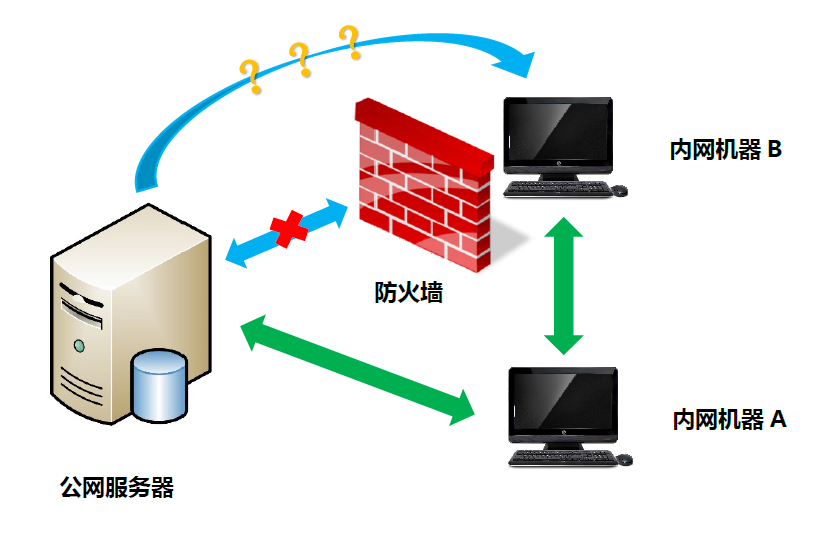
From the perspective of information flow, this requirement should be achievable: because the public server and the Internet-capable machine inside the LAN can exchange data, and the Internet-capable and non-Internet-capable machines inside the LAN can also exchange data, as shown by the two green arrows in the diagram. Therefore, when implementing SSH port forwarding, we need to specify an IP address to indicate whether we are forwarding the client’s own port or the port of another machine on the same internal network as the client.
In addition, for a slightly more complex scenario like the one above, the entire forwarding process involves three machines: the public server, machine A inside the LAN that can access the Internet, and machine B that cannot; and it only consumes a new port on the public server. Therefore, on the public server, you need permission to open that port, but on internal machines A and B, no extra permissions are required. For machine A, it merely establishes an SSH connection, as long as it can reach the corresponding port on machine B; and for machine B, its port is open and can be accessed by any machine on the LAN, so likewise no special configuration is needed.